WordPress to edit, static to serve: the RefrigeratorRepair.center build
The team edits in WordPress; visitors get plain static pages built with Eleventy. Here is how that works on RefrigeratorRepair.center, and what it costs.


Short answer
We let the team edit in WordPress, and a custom publisher rebuilds the public site with Eleventy as plain static HTML whenever content changes. Visitors get pre-built pages with no PHP or database work per request, and Lighthouse measured Performance 100 on desktop and 96 on mobile for the homepage on November 3, 2026. The price is extra work for previews, forms and anything dynamic.
On this page6 sections
What the site had to do
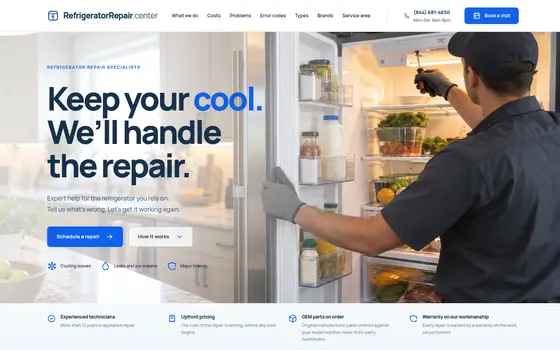
RefrigeratorRepair.center is the website of an independent refrigerator repair company whose website lists nine US metro areas. Its visitors are usually homeowners with a warm refrigerator, anxious and in a hurry. The site had to answer three questions quickly: can you fix my kind of refrigerator, roughly what will it cost, and how soon can someone come.
It also had to cover 31 refrigerator brands, several refrigerator types and every service city without turning into a directory of thin listings. That is a lot of pages, and the team needed to keep them accurate without calling a developer for every change.
We built it as one site with two faces: WordPress for the people who edit it, and a static build for the people who visit it. The full write-up is in the case study; this note is about the architecture and its trade-offs.
Starting from the symptom, not the service list
Most repair sites are organized around what the company sells. This one is organized around what the visitor notices. Common symptoms open into short, honest self-check guides, so a visitor can rule out simple causes before paying for a visit. Built-in, column, French door, side-by-side and undercounter units each get their own entry point, so people recognize their appliance first and read the right advice second.
From any page, booking takes three short steps: appliance and problem, preferred time, contact details. The steps sit beside a plain explanation of what happens next. Helping first and asking second is what turns a worried reader into a booking.
How the build works
The team edits brands, symptoms, cities and repair-cost notes in a familiar WordPress admin. WordPress never renders the public pages. A custom publisher listens for changes and rebuilds the site with Eleventy, a static site generator that writes plain HTML files. Styling is Tailwind CSS, compiled at build time, so only the classes the templates actually use reach the browser. Visitors get pre-built pages: no PHP running per request, no database queries, no plugin stack loading on the front end. This is headless WordPress with a statically generated front end, rather than a JavaScript app fetching content in the browser. It is finished HTML, produced ahead of time.
In Lighthouse runs in November 2026, the homepage scored 100 for Performance on desktop and 96 on mobile (lab measurements, November 3, 2026), with 100 for Accessibility, Best Practices and SEO. These are lab measurements, not field data from real visitors, but they show how little weight the front end carries. Fast, stable pages are also what Core Web Vitals measure in the field.
What gets harder
A static front end is not free. These are the costs we planned for:
- Previews. The WordPress Preview button shows a page rendered by WordPress, not the Eleventy output. If editors need to see the exact public page before it goes live, a preview build has to be added on purpose.
- Forms. A static page cannot process a submission by itself. The booking form needs somewhere to send its data, such as a small server endpoint, and that endpoint needs validation, spam protection and monitoring like any other back end.
- Dynamic parts. Anything that changes per visitor or per minute, such as search, live availability or a logged-in area, has to run in the browser or on a separate service. It cannot come from the static HTML.
- Plugins. Many WordPress plugins work by changing the theme’s output. With no WordPress theme on the front end, their front-end features simply do not appear. Each one has to be replaced or rebuilt in the templates.
- Two things to maintain. The content model lives in WordPress and the templates live in Eleventy. Adding a field means changing both, and the publisher itself is code that needs looking after.
- Build time. Every change triggers a rebuild. Rebuild time grows with the number of pages; a much larger site would need incremental builds and more care.
When this approach fits
It fits well when:
- content changes a few times a day, not every second;
- most pages are the same for every visitor;
- speed directly affects whether people act, as it does for an urgent repair;
- editors already know WordPress and should not have to learn a new tool.
It fits poorly when the site depends on per-user content, a store with live stock and carts, membership areas, or a long list of front-end plugins the business relies on. In those cases a well-built conventional WordPress theme with good caching is usually the more honest choice, and that is what we would recommend.
The useful question is not “static or dynamic?” but “which parts of this site actually change per request?” If the answer is “almost none”, a static build is worth considering.
What we would do again
Keep the editing experience familiar. Put the effort into the content model, because brands, symptoms, types and cities are structured information, not free-form pages. Decide early how forms and previews will work, since those are the parts that surprise teams later. If you are weighing a similar setup, see our WordPress development and web design services, or send us a short description of your site.
Tested with: Lighthouse 12.8.2, homepage, desktop and mobile presets, November 3, 2026 · Reports: desktop, mobile
Key takeaways
- Editors keep a familiar WordPress admin, while visitors receive pre-built static HTML.
- A custom publisher rebuilds the site with Eleventy after each change, so visitors receive prebuilt HTML.
- Previews, forms, per-visitor features and front-end plugins all need deliberate solutions in this setup.
- The approach fits sites whose pages are the same for every visitor and where speed affects whether people act.
 Case studyRefrigeratorRepair.centerHome services · United States
Related serviceWordPress developmentWordPress & custom themes
Sources
 Den DyuzhaevFounder & lead developer
Den builds and maintains websites for companies and individual clients in the US and Europe — WordPress on the Roots stack, Laravel, SEO and AI search. Building client websites since 2013.
More about Den